New Xton Documentation Center
Xton help has moved. Please visit the current version of this page for the most recent updates. Our new documentation center can be found at help.xtontech.com.
How to Control Elevated Privilege in a SSH/SU session (sudo execution or directly executing su utility)
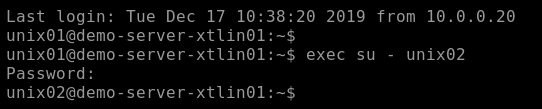
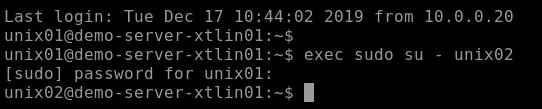
XTAM includes the option to control the command to elevate privilege in a SSH/SU session to run through sudo execution or directly executing su utility. With this option included, the system will use exec sudo su – user command to elevate user privilege instead of the default exec su – user command.
The option is controlled by a custom record-level field Type on Unix with SU record type or its inherited derivatives.
- Field Type: Checkbox
- Name: sudo
- Display Name: Use sudo
- Order: 620

You will need to create this custom field within a Record Type. To learn about creating custom fields, please review this article.
Now, within the record that uses the Record Type with this custom field, you will have a checkbox option named Use sudo.

- When Use sudo is enabled (checked), XTAM will authenticate sudo su with the User password.
- When Use sudo is disabled (unchecked), XTAM will authenticate su with the SU User password.