New Xton Documentation Center
Xton help has moved. Please visit the current version of this page for the most recent updates. Our new documentation center can be found at help.xtontech.com.
Creating secure PAM RDP sessions in your web browser
For the times when you can’t get to or use your favorite desktop or mobile RDP client like MSTSC, mRemote or Remote Desktop Connection Manager, just open your browser (desktop or mobile) and connect to your privileged endpoint using the RDP protocol. With XTAM, you can create secure, password-less RDP sessions in your web browser without installing agents or native RDP clients.
XTAM secures your RDP connection credentials and passwords will providing the option to easy connect to the endpoint without disclosing the secrets, all while layering audit, recording, permissions, workflows and policy enforced restrictions on the session.
Creating a RDP session using only a browser in XTAM
In XTAM, create a new record using the Windows Host record type.
Populate all the fields with your Windows endpoint’s connection details.
Click the Save and Return button.
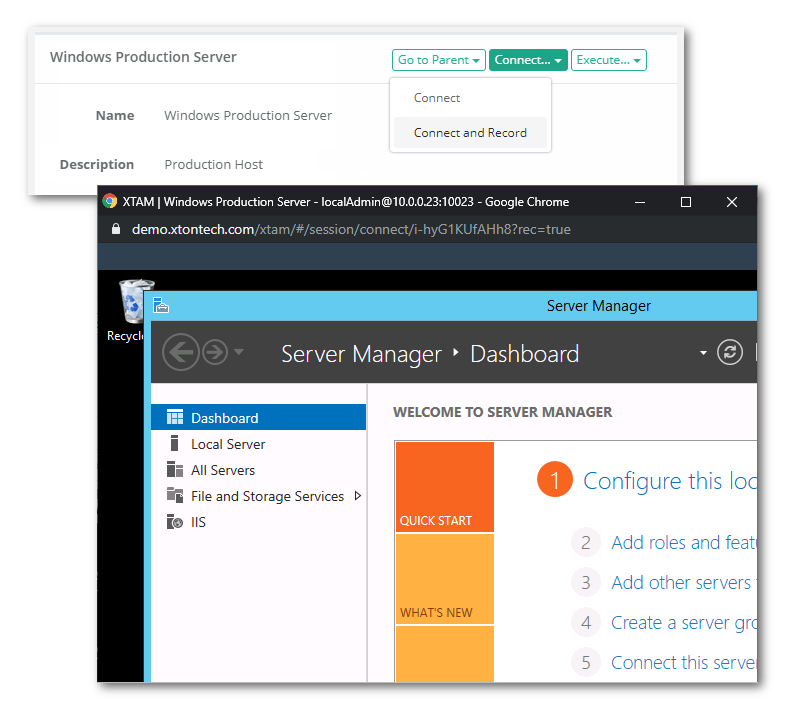
On the record’s Details page, click the Connect button.
XTAM will now open a new browser window or tab and create your secure RDP session right in your web browser, no agents or clients required! The session’s Audit events, recordings, permissions and history can all be accessed from the options right in the records’s Details page.
Now that you created your Windows Host endpoint record, share it with other users, apply an approval workflow or even setup a task to begin your automated password rotation policy.